ThemeHub: Themes, Widget Icons
- 4.9
- Rating
- 100.00K
- Installs
- Free
- Price
 Analysis by App-foxy
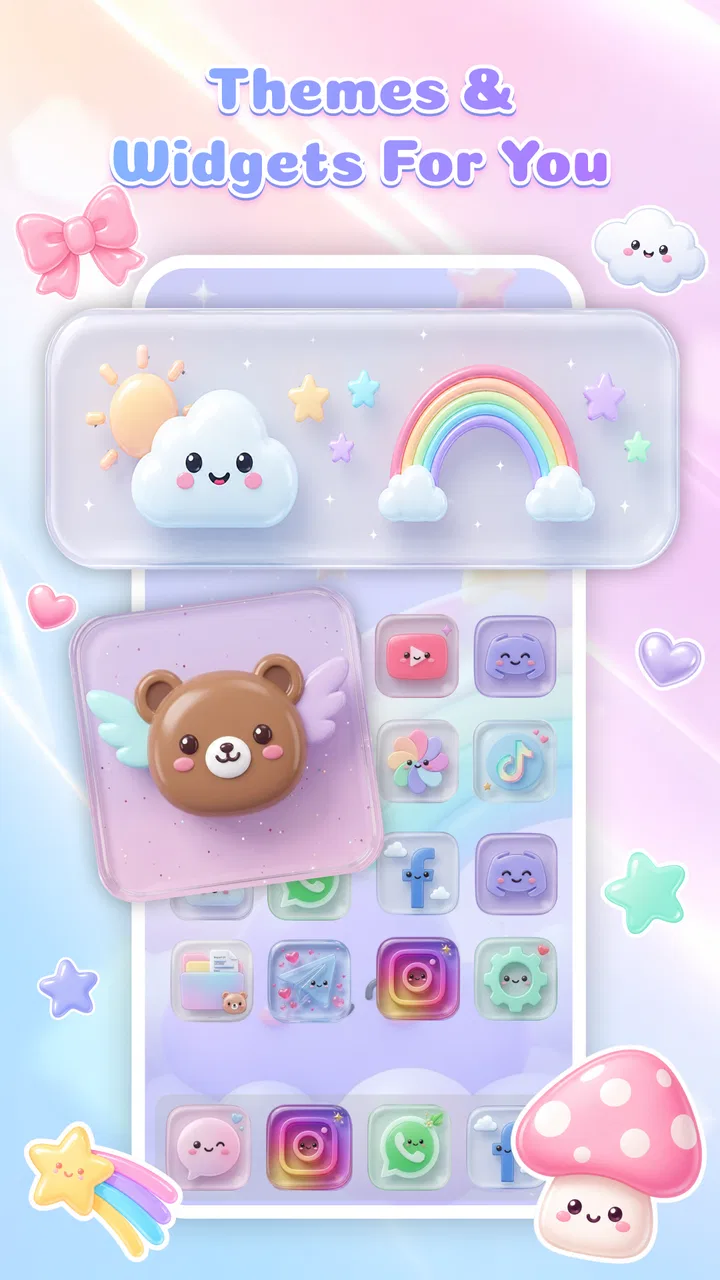
I spent time with ThemeHub: Themes, Widget Icons as a personalization app, and my first impression was straightforward: it is aimed at people who want their phone to feel more personal without turning customization into a major project. The app comes from MANDALA CONSULTING CO.,LTD and focuses on visual changes such as themes, icons, and widgets. That combination makes it more useful than a simple wallpaper picker, especially if you enjoy matching several parts of your home screen instead of changing only the background.
The app is free, which immediately makes it easy to try without making a purchase decision first. It is rated for Everyone, works from Android 8.0 onward, and the current version is 1.0.3. Those details matter because this is the kind of utility people often install on an older spare phone, a family device, or a handset that still works well but looks dated. I also noticed that it has passed the 100K+ install mark and holds a 4.9 average from around 300 ratings. That is encouraging, although the small number of written reviews means the score should be treated as a useful signal rather than a complete picture of every experience.
What the app changes on your phone
ThemeHub sits in the phone personalization space, but its appeal is more specific than that broad label suggests. The idea is to bring the visual pieces of a home screen into one style: the background, app icons, and widgets. In everyday use, that can make a phone feel calmer and more deliberate. Instead of collecting unrelated downloads and trying to make them work together, you can approach the home screen as one small design project.
You May Also Like

 Blood Strike: 2.5 Anniversary
Blood Strike’s Loadouts Turn Every Drop Into a Tactical Gamble
A close look at Blood Strike’s custom loadouts: how fast access to signature weapons reshapes its battle royale rhythm, rewards preparation, and narrows the gap between fights.

 Pandora - Music & Podcasts
Pandora’s Music Is Easy to Start, but Harder to Recover
Pandora’s strength is its low-effort path from a seed to a station. Its weak spot is how much confidence it asks you to place in connection, setup, and quiet recovery.

 8 Ball Pool
 Is Built on Rivalries, Rematches, and Routine
A close look at the rivalries, rematches, shared routines, and unanswered safety questions that turn a quick pool match into a persistent mobile community.

 Samsung Music
’s Quiet Strength Is Playing What You Already Own
Its reach comes less from spectacle than from dependable access to a personal library. That simplicity is both the app’s strongest retention engine and its ceiling.

 AccuWeather: Weather Radar
AccuWeather Review: A Quick, Clear Forecast for Everyday Decisions
For everyday plans, the best forecast is the one you can understand quickly. AccuWeather makes rain timing, radar, and local conditions easy to act on, with a few trade-offs.

 Hill Climb Racing
Why Hill Climb Racing Still Turns Crashes Into One More Run
A tiny car, a bumpy hill and one more upgrade: Hill Climb Racing keeps resurfacing because its simple chaos makes every near-miss feel personal.
More From Our News Desk



I particularly like this approach for anyone who treats the first screen of the phone as a practical space rather than a drawer of shortcuts. A soft theme can make a reading-focused layout feel less distracting, while a brighter set of icons can make a family member’s device easier to recognize at a glance. The same app can therefore serve two very different purposes: decoration for someone who enjoys aesthetics, or basic organization for someone who wants a clearer visual routine.
The store summary points to cute and aesthetic designs, so the visual direction is not trying to be a neutral business tool. If you prefer playful, gentle, or decorative styling, the concept should feel natural. If your taste is strictly minimal, monochrome, or highly technical, you may find the selection less aligned with your preferences. That is not a flaw by itself, but it is an important expectation to set before installing.
A simple way to use it
My recommended starting point is to choose one area of the phone that bothers you rather than redesigning everything immediately. For example, if the home screen looks cluttered, begin with a theme and then add only a widget that supports something you already check regularly. This prevents a common customization mistake: filling the screen with attractive elements that make the phone harder to use.
I would then place the most important apps around the visual changes instead of hiding them inside a decorative layout. Messaging, maps, camera, and settings should remain easy to reach. The best result is not the most elaborate screen; it is a screen where the style supports your habits. ThemeHub is more valuable when you use its visual tools to create a repeatable arrangement, not when you keep changing the setup every few minutes.
A useful workflow is to create one “daily” look and one more expressive look. The first can use softer colors and fewer visual distractions for work or study. The second can be reserved for weekends, holidays, or simply a mood change. Even if you do not switch themes frequently, thinking in these two modes helps you decide whether a design is genuinely comfortable or merely attractive in a preview.
Where the widgets matter most
Widgets are easy to judge by appearance alone, but their real value comes from how much they reduce unnecessary tapping. I would use a ThemeHub widget only when it gives the home screen a clear purpose. A clock, date element, or compact information panel can make the layout feel finished while still being useful. Several decorative widgets competing for attention can have the opposite effect.
There is also a practical trade-off between a large widget and a clean icon grid. A bigger visual element may make a theme feel more complete, but it can push frequently used apps onto another screen. For a phone used heavily throughout the day, I would test the layout during normal routines rather than judging it after a quick setup. Open the apps you use most, return to the home screen, and see whether the arrangement still feels natural after repeated use.
Another small but important tip is to judge a theme in both bright and dim surroundings. A design that looks charming in a well-lit room may feel too low-contrast at night, while a busy icon set can become tiring when you are checking the phone quickly. This kind of real-world check is more useful than choosing solely from a polished preview.
How it compares with ordinary alternatives
The usual alternative is to customize each part separately: find a wallpaper, install or select an icon pack, and add widgets from unrelated tools. That route can offer more control, especially for experienced Android users who enjoy mixing styles. The downside is that matching colors, shapes, and spacing becomes your responsibility. ThemeHub’s main advantage is the possibility of a more coherent result with less searching.
A launcher-centered setup is another alternative. Launchers can provide deeper control over grids, gestures, folders, labels, and transitions, so they are better for someone who wants to redesign the behavior of the home screen as well as its appearance. ThemeHub is the more approachable choice when the goal is visual refresh rather than a complete replacement for the phone’s normal interface.
Wallpaper-only apps are simpler and may be preferable if you want a quick change with almost no adjustment. However, they do not address mismatched icons or an empty-looking widget area. ThemeHub earns its place when you want those pieces to feel connected. On the other hand, if you already have a carefully built launcher setup, adding another customization layer may create more work than value.
Cost, value, and the compromises behind the free download
The cost question is refreshingly clear: ThemeHub is free to install. That means the initial value is easy to assess because you can explore its personalization concept without paying upfront. I would still separate “free to try” from “perfect for everyone.” A free app can save money while costing time if its style does not match your taste or if the setup process feels more involved than expected.
For someone who wants a visual refresh without buying a separate collection of design tools, free access is a meaningful benefit. It lowers the barrier for experimentation, particularly on an older Android device where a full launcher overhaul may feel excessive. You can decide whether the themes, icons, and widgets improve your daily experience before committing to a new way of using the phone.
The strongest value comes from combining several visual elements in one project. If you would otherwise search separately for a matching background, icon treatment, and widget style, a unified personalization app can reduce that effort. The value is less compelling for users who only want a single wallpaper or who already own a favorite icon pack that they never intend to replace.
I also would not judge the app solely by its high rating. An average of 4.9 is a positive sign, and the install count shows that it has reached a substantial audience, but the written feedback is limited. That makes hands-on testing especially important. The free price helps here: you can evaluate the visual quality and the practicality of the result without turning the decision into a financial gamble.
Trade-offs worth considering before setup
The first trade-off is style versus flexibility. A coordinated theme can look much better than a collection of unrelated elements, but coordination usually means accepting the designer’s visual choices. If you want to adjust every color, icon shape, spacing rule, and widget detail independently, a dedicated launcher or separate customization tools may suit you better.
The second is appearance versus speed. A decorative home screen can be enjoyable, but every added element needs to earn its space. If your phone is mainly a tool for quick communication, navigation, and work, a visually rich arrangement may slow you down. I recommend keeping the first page functional and using a second page for more expressive widgets or themed shortcuts.
The third is consistency across the whole device. ThemeHub can influence the home-screen experience, but the phone still includes screens and applications with their own designs. A themed home screen will not necessarily make every app inside the phone follow the same visual language. Users looking for a complete system-wide transformation should keep that boundary in mind and consider whether a launcher or operating-system-level option would be a better fit.
There is also a personal maintenance cost. Once you start customizing, you may notice that one icon, widget, or folder no longer fits the arrangement. That can lead to repeated tweaking. I found the best way to avoid this is to decide on a small visual rule before starting, such as warm colors, soft shapes, or a limited number of widgets. A clear rule makes the final screen feel intentional and reduces endless rearranging.
Who will get the most from it
ThemeHub is a strong match for Android users who want a cute or aesthetic home screen and prefer a guided visual direction over building everything from separate sources. It should also appeal to people who enjoy changing their phone’s mood seasonally or who want a more welcoming layout on a personal device. Because it supports Android 8.0 and newer, it is worth considering for users whose phones are not running the latest operating system.
It can be especially useful in an everyday scenario where a phone has become visually stale. Imagine returning from work, looking at a screen filled with old shortcuts, and wanting a small reset rather than a technical project. You could apply a calmer theme, place a useful widget where your eye naturally lands, and reorganize only the apps you use each morning. That kind of ten-minute refresh is where the app’s free access and combined design focus make practical sense.
I would also recommend it to someone setting up a secondary phone for a child or relative, provided the chosen layout remains simple. A clear theme and carefully placed icons can make the device feel less confusing. The Everyone age rating supports its broad accessibility, although a responsible adult should still decide which apps and shortcuts belong on that particular phone.
There are clear reasons to skip it as well. If your priority is advanced launcher behavior, gesture customization, highly precise grid control, or a completely uniform system interface, you may outgrow a theme-focused tool quickly. It is also not the best choice for someone who dislikes decorative design and wants the absolute fastest route to a plain, functional home screen.
My practical verdict
I see ThemeHub: Themes, Widget Icons as an easy, low-risk way to give an Android phone a more considered appearance. Its appeal is not that it replaces every customization option available elsewhere. Its appeal is that it brings the visual idea of themes, icons, and widgets together, making a coordinated home screen easier to imagine and try.
The free price is the deciding advantage for cautious users. You can explore the app without paying first, and the current version, 1.0.3, is suitable for devices running Android 8.0 or later. MANDALA CONSULTING CO.,LTD has positioned it for broad personal use rather than for advanced interface engineering, and that focus is apparent in the kind of user who will enjoy it most.
My advice is to install it if you want a cute or aesthetic refresh, especially when your current home screen feels mismatched or dull. Start with one theme, one useful widget, and a small set of essential icons. Give the layout a full day of normal use before deciding whether it works. If you still want deeper control after that, move to a launcher or a mix-and-match setup. If the coordinated look makes your phone more pleasant without getting in your way, ThemeHub has already delivered its value.
My recommendation: try it for a simple visual makeover, but choose practicality over decoration when arranging the final screen. The app is most convincing as a free starting point for personal expression, not as a replacement for every advanced customization tool on Android.
FAQs for ThemeHub: Themes, Widget Icons
01What features does ThemeHub offer?
ThemeHub provides a vast collection of themes, widget icons, and wallpapers to personalize your device. It allows users to customize their home screen with unique designs, offering both free and premium options. The app is regularly updated with new content to keep your device's appearance fresh and trendy.
02Is ThemeHub compatible with all Android and iOS devices?
ThemeHub is designed to be compatible with most Android and iOS devices. However, some features may not be available on older operating systems. It's recommended to check the app's compatibility requirements in the app store description to ensure it works seamlessly on your device.
03Are there any in-app purchases or subscriptions in ThemeHub?
Yes, ThemeHub offers in-app purchases and subscription plans. While many themes and icons are free, premium content may require a one-time payment or a subscription. Subscriptions often provide access to exclusive content and regular updates, enhancing your customization experience.
04How user-friendly is ThemeHub for beginners?
ThemeHub is designed with a user-friendly interface, making it accessible for beginners. The app provides easy navigation through its various sections, with clear instructions on how to apply themes and icons. Additionally, it features a helpful tutorial for first-time users, ensuring a smooth customization process.
05Does ThemeHub affect device performance or battery life?
ThemeHub is optimized to minimize impact on device performance and battery life. While applying themes and widgets can slightly increase battery usage, the app is designed to ensure efficient performance. Users can monitor battery consumption through their device settings to manage any potential impact.
Pros
- Highly customizable themes.
- User-friendly interface.
- Regular updates with new themes.
- Widgets and icons are diverse.
- No ads in the premium version.
Cons
- Limited free options.
- Requires internet for updates.
- Occasional bugs in theme installation.
- Some features locked behind paywall.
- Battery drain with frequent use.

ThemeHub: Themes, Widget Icons
Gallery